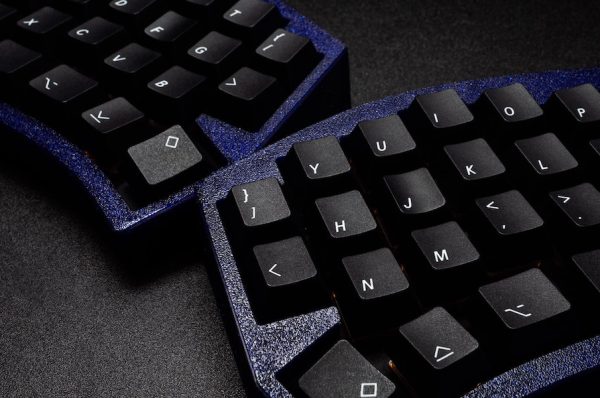
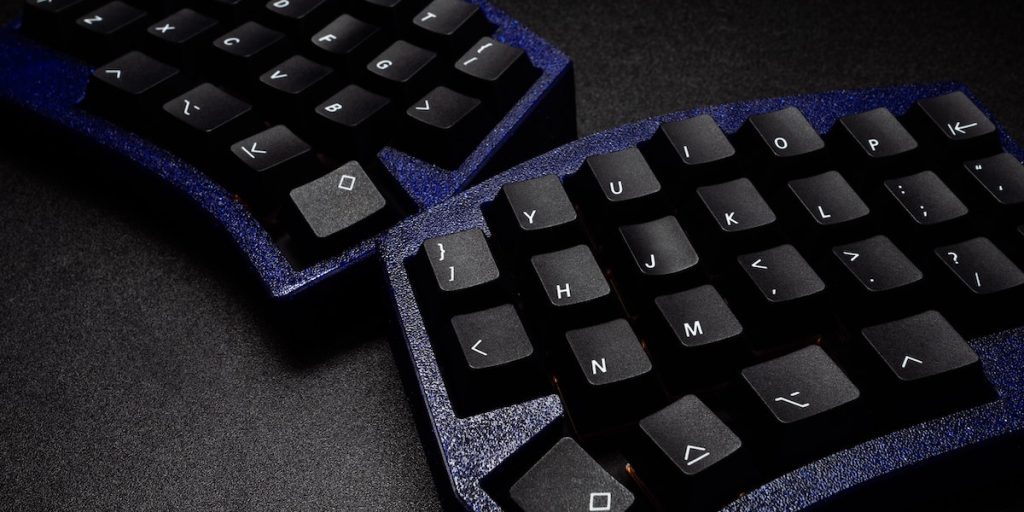
Living with arthritis can make typing on a standard keyboard a painful challenge, often exacerbating symptoms during work or leisure computer activities. However, there is a solution: arthritis-friendly keyboards are specifically designed to minimize hand and wrist strain, making typing more comfortable and sustainable. This guide explores the best keyboards for arthritis sufferers, helping you choose the ideal option to meet your needs and budget.
Discover a variety of ergonomic keyboards that cater to those with arthritis, including models with split designs and specialized ergonomic mice. These keyboards are perfect for anyone from professional writers and students to casual computer users, offering not only relief from pain but also enhanced efficiency and comfort during computer use.
Whether you’re looking to reduce discomfort or improve your typing speed, our review of arthritis-friendly keyboards will assist you in finding the right tool to enhance your computing experience.
What is an Ergonomic Keyboard?
An ergonomic keyboard is a keyboard designed to minimize hand and wrist strain, providing a more comfortable typing environment. These innovative keyboards are tailored to align with the natural hand positions and often feature split keys, tenting, and palm rests, which are essential for preventing musculoskeletal disorders.
Particularly beneficial for individuals with arthritis or similar conditions that result in hand and wrist pain, ergonomic keyboards help relieve joint pressure and reduce the risk of further injuries. Many of these keyboards offer adjustable settings and customizable options, allowing users to personalize their setup according to their specific needs and preferences. By integrating best ergonomic keyboards into their workspace, users can enhance their typing comfort and potentially improve their overall productivity and health.
Who Is an Ergonomic Keyboard Good for?
Ergonomic keyboards are an excellent choice for anyone who spends considerable time typing, aiming to minimize hand and wrist strain. Ideal for office workers, writers, programmers, and students, these keyboards are designed to enhance comfort and reduce potential injuries associated with prolonged keyboard use.
They are particularly beneficial for individuals suffering from hand or wrist pain, including those diagnosed with arthritis or carpal tunnel syndrome. Using a standard keyboard can be challenging for such individuals, but an ergonomic keyboard can significantly alleviate discomfort and enhance typing ease.
Additionally, ergonomic keyboards are recommended for those at risk of developing hand and wrist issues due to their professional or hobby-related activities. By opting for an ergonomic design, users can proactively prevent the onset of musculoskeletal problems, ensuring a healthier, more comfortable typing experience.
The 10 Best Keyboards for Arthritis
If you’re in the market for a new ergonomic keyboard, be sure to consider these top picks for people with arthritis.
Apple Magic Keyboard
The Apple Magic Keyboard is a great choice for people with arthritis who are looking for a comfortable and easy-to-use keyboard. Its standout feature lies in its flat and low design, which minimizes finger and wrist movement, thereby reducing strain on arthritic joints and alleviating typing discomfort.
Key highlights of the Apple Magic Keyboard include Scissor switch keys, renowned for their ease of pressing and short travel distance, enabling swift and accurate typing. Moreover, its wireless functionality, decent battery life, and cross-compatibility enhance its versatility and convenience.
Although some users may miss the tactile feedback of traditional keyboards, the Apple Magic Keyboard’s low-profile, ergonomic design renders it an ideal option for arthritis sufferers.
No products found.
Kinesis Freestyle Pro Ergonomic Split Mechanical Keyboard
The Kinesis Freestyle Pro Ergonomic Split Mechanical Keyboard is a top choice for people with arthritis who are looking for a keyboard that is both comfortable and programmable.
One of the unique features of this keyboard is its adjustable linking cable, which allows users to customize the distance between the two key modules to suit their body type and preferences. The keyboard also has a zero degree slope form factor, which helps to reduce wrist extension and minimize strain on the joints. In addition to its ergonomic design, the Freestyle Pro offers full on-board programmability, allowing users to easily switch between different layouts or create their own.
The keyboard also has Cherry MX Brown mechanical key switches, which provide a low-force, tactile response to help reduce the impact on the fingers. For added comfort, the Freestyle Pro is also compatible with tenting accessories and padded palm supports. Overall, the Kinesis Freestyle Pro is an excellent choice for people with arthritis who want a customizable and comfortable keyboard.
No products found.
Kinesis Freestyle2 Ergonomic Keyboard
The Kinesis Freestyle2 Ergonomic Keyboard is a sleek and low-profile option crafted to alleviate strain on hands and wrists.
One of the standout features of this keyboard is its adjustable design, which allows users to customize the distance between the two key modules to suit their body type and preferences. The keyboard also has a zero degree slope form factor, which helps to reduce wrist extension and minimize strain on the joints. In addition to its ergonomic design, the Freestyle2 has low-force, tactile membrane key switches, which provide a quiet and comfortable typing experience.
The keyboard also has driverless hot keys for commonly used mouse actions, such as Internet page forward and back, undo, and web home, as well as a familiar key layout to minimize adaptation time. For added comfort, the Freestyle2 is also compatible with optional padded palm supports, which help to keep wrists neutral and reduce wrist extension.
Overall, the Kinesis Freestyle2 is an excellent choice for people with arthritis who want a comfortable and customizable keyboard.
No products found.
Kinesis Advantage2 Ergonomic Keyboard
The Kinesis Advantage2 Ergonomic Keyboard is a top choice for people with arthritis who are looking for a comfortable and customizable keyboard.
This keyboard features Kinesis’ patented Contoured design, which includes concave keywells, a tented layout, and integrated palm supports to reduce strain on the hands and wrists. The Advantage2 also has low-force Cherry MX Brown mechanical key switches, which provide a tactile response to help reduce the impact on the fingers.
In addition to its ergonomic design, the Advantage2 has a powerful programming engine, allowing users to customize the keyboard to boost productivity. Overall, the Kinesis Advantage2 is an excellent choice for people with arthritis who want a keyboard that is designed to reduce hand and wrist strain.
No products found.
Logitech MK550 Wireless Wave Keyboard
The Logitech MK550 Wireless Wave Keyboard is a great choice for people with arthritis who want to reduce strain on their hands and wrists.
One of the standout features of this keyboard is its comfort curve design, which combines a dynamic curved layout with the familiarity of a straight keyboard. This helps to position the hands comfortably on the keyboard and offers a cushioned palm rest for added support. The keyboard also has a wave-shaped keyframe, which helps to reduce strain on the fingers and wrists.
Additionally, the Logitech MK550 is a wireless keyboard and mouse combo, which allows for greater flexibility and convenience. Overall, the Logitech MK550 is a comfortable and ergonomic keyboard that is well-suited for people with arthritis.
No products found.
Microsoft Sculpt Ergonomic Keyboard
The Microsoft Sculpt Ergonomic Keyboard is a top choice for people with arthritis who are looking for a comfortable and ergonomic keyboard.
This keyboard is built on advanced ergonomic principles, with a split layout that keeps wrists and forearms in a relaxed position and a cushioned palm rest to provide wrist support. The domed shape of the keyboard helps to reduce and correct wrist pronation, which can cause pain and limited mobility. The Microsoft Sculpt Ergonomic Keyboard is designed for productivity, with a natural arc layout that follows the curve of the fingertips for a more natural way of typing.
The keyboard also has a reverse tilt design that positions it at the correct angle to give you a straight, neutral wrist position. Additionally, the shape of the mouse is designed for maximum wrist comfort and the Windows button provides one-touch access to the Windows Start Menu.
Overall, the Microsoft Sculpt Ergonomic Keyboard is an excellent choice for people with arthritis who want a comfortable and ergonomic keyboard.
No products found.
Mistel BAROCCO MD770 TKL Split Mechanical Keyboard
The Mistel BAROCCO MD770 TKL Split Mechanical Keyboard is a great option for those with arthritis, as it offers a unique split design that allows you to keep your wrists at a neutral angle, reducing pressure and strain over time.
The keyboard is also lightweight and slim, with a height of only 34.5mm, making it easy to use for extended periods of time. Additionally, the keyboard features Cherry MX Blue Switches, which are tactile and heavy-clicky, providing feedback to the user with a tactile bump and audible click. However, the Cherry MX Blue switches may be too loud for some corporate workspaces. The Mistel BAROCCO MD770 TKL also has programmable macro and remapping support, allowing you to customize the keyboard based on your specific needs, whether you are a gamer, typist, or programmer.
The keyboard also has built-in memory, allowing you to save up to three layers of configurations to handle multiple usage scenarios. The keycaps on the Mistel BAROCCO MD770 TKL are made with PBT double shot material, providing durability and stability, as well as legends that won’t fade. The keyboard also has rubber feet with more aggressive tilting ability.
No products found.
MoErgo Glove80 Mechanical Keyboard
The MoErgo Glove80 Mechanical Keyboard is an excellent choice for individuals with arthritis due to its exceptional ergonomic design. This keyboard features a split, wireless layout that allows users to position each half at a comfortable shoulder width, minimizing strain on the shoulders and wrists.
The integrated tenting kit helps maintain a natural wrist angle, reducing forearm pronation, which is a common issue for arthritis sufferers. Additionally, the concave key wells and columnar layout follow the natural curvature of the fingers, reducing the need for awkward lateral movements and allowing for more comfortable, extended typing sessions. The innovative thumb cluster design further alleviates strain by enabling easy access to frequently used keys without moving the palms.
Overall, the Glove80’s thoughtful ergonomic features make it an ideal solution for those looking to type with less pain and fatigue.
Logitech ERGO K860 Keyboard
The Logitech ERGO K860 is an excellent keyboard for those with arthritis, designed to enhance comfort and reduce strain. Its split, curved keyframe promotes a natural hand, wrist, and forearm posture, significantly alleviating discomfort. The pillowed wrist rest provides enhanced wrist support and reduces wrist bending, which is beneficial for arthritis sufferers.
Additionally, the adjustable palm lift feature helps maintain a natural wrist position, whether seated or standing, further reducing muscle activity and promoting a relaxed typing experience. Overall, the ERGO K860 combines ergonomic design with productivity, making it a great option for comfortable and efficient typing.
No products found.
ZSA Moonlander Keyboard
The ZSA Moonlander is an ergonomic keyboard designed to offer maximum comfort and customization, making it an excellent choice for those with arthritis. Its split design allows each half to be positioned independently, reducing strain on the wrists and shoulders. The tenting system helps maintain a natural wrist angle, alleviating discomfort during prolonged typing sessions. Additionally, the thumb cluster minimizes hand movement, and the adjustable palm rest ensures that hands remain in a neutral position, further enhancing comfort.
This keyboard is highly customizable, featuring hot-swappable switches, programmable RGB backlighting, and a modular design that includes a carrying case for portability. Users can select the key feel that best suits their needs without soldering, and the integrated palm rest can be adjusted for optimal comfort. Overall, the ZSA Moonlander combines ergonomic design with extensive customization options, making it ideal for reducing the strain and discomfort associated with arthritis while typing.
Budget Arthritis Keyboards
If you’re looking for an ergonomic keyboard that’s a little more affordable, check out these options:
No products found.
Frequently Asked Questions (FAQs)
Can I use these ergonomic keyboards on both Windows and Mac computers?
Yes, all of the featured ergonomic keyboards are compatible with both Windows and Mac operating systems. Plus, they come with specific shortcut keys for each system to ensure a seamless typing experience.
Does the split design really make a difference in reducing strain and discomfort?
Absolutely. The split design helps to position your wrists and forearms in a more natural, relaxed position, reducing muscle strain and discomfort that can occur with traditional keyboards. Plus, the split design allows for a more customizable typing experience to fit your personal preferences.
Are these keyboards wireless or wired?
There are both wireless and wired options available among the featured ergonomic keyboards. Choose the one that best suits your needs and preferences. And for wireless options, they all come with the convenience of rechargeable batteries.
Final Thoughts
For individuals living with arthritis seeking a keyboard to alleviate strain on their hands and wrists, the market offers a range of options designed with specific ergonomic features.
Ergonomic keyboards, available in various shapes and sizes, incorporate split keys, tenting, and palm rests to mitigate musculoskeletal strain. Ideal for individuals spending prolonged periods typing, such keyboards cater to office workers, writers, programmers, and students alike, aiming to minimize hand and wrist strain.
These keyboards are particularly advantageous for individuals with arthritis, carpal tunnel syndrome, or those at risk of hand and wrist pain. Their ergonomic design aims to enhance comfort and reduce the likelihood of developing musculoskeletal disorders associated with extended typing sessions.