An excellent 65% mechanical keyboard should be compact with no creaking or wobbliness. When hitting the keys, it should have great latency, incredible build quality, and a solid feel. In addition, there should be lots of quality switch options and freedom of customization for users.
There are lots of 65% mechanical keyboards in the market right now, and quite frankly, a few good ones will make you get rid of your present keyboard for another one in a heartbeat.
In this article, we’d be going through the essential things to consider when buying a 65% keyboard, features and components of the 12 best ones in the market presently, and things to consider when choosing one for gaming, programming, or just good old typing.
What is a 65% Mechanical Keyboard?
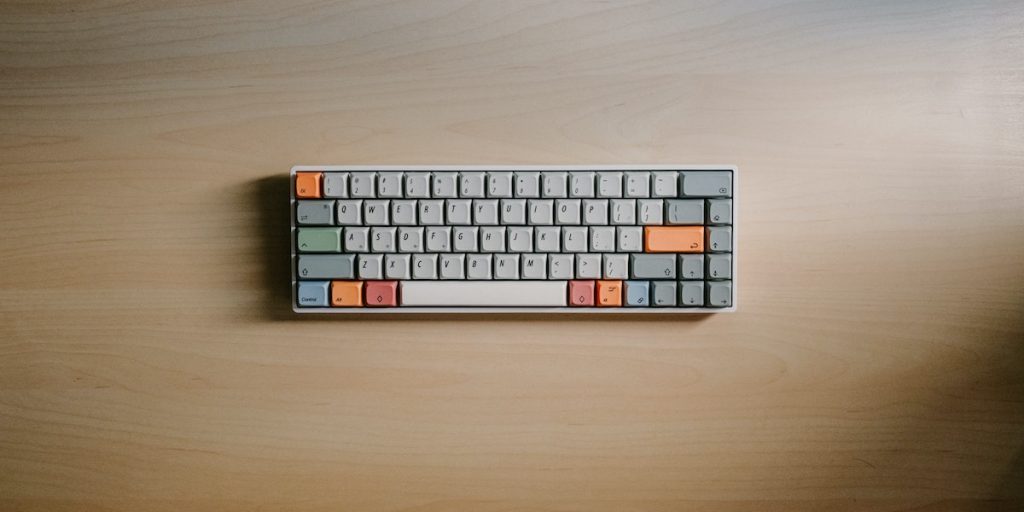
65% keyboards are the perfect balance between a TKL and 60% keyboard. A 65% keyboard is a typical mechanical keyboard with alphanumeric keys, arrow keys, and modifiers.
The keys on the right-hand side of the board are mostly included in the area above the arrow keys in full-size keyboards. They consist of the page up and page down, home, and delete keys. Due to their mechanical switches, 65% keyboards have a more precise and consistent feel and are popular with hard-core gamers and minimalists.
How Many Keys Are on a 65% Mechanical Keyboard?
Lots of unique keyboards brands are growing in popularity for gamers and people that find joy in hearing the click-clack of their keyboards. Since there’s no F-row or numerical pad, all 65% keyboards feature 66 to 68 keys with 68 switches.
Things to Consider When Choosing a 65% Keyboard
Choosing a 65% keyboard just for its feel or the space it frees up on your desk is not enough. Before you splash your money on a 65% keyboard, consider these essential things.
Build Quality
Mechanical keyboards generally offer more, which makes the build quality on most 65% keyboards borderline impressive with secure and great stabilizers. But then, brands offer more quality on their products than each other for some reason. When choosing a 65% keyboard, it is essential to pay attention to the build quality of what you are about to spend your cash on.
Quality products will offer you great value for your money. You won’t want the keys on your 65% keyboard to start rattling after a couple of weeks.
when choosing a 65% keyboard
Switch Type
Most 65 percent of keyboards are mechanical and can feature all switch types available for mechanical keyboards. Whether you decide to opt for a clicky, tactile, or linear keyboard, there are many incredible options to choose from.
Cherry MX switches offer the best switches for any 65% keyboard out there. Some others you can settle for are Kaihua box whites, Cherry MX Blues, Halo Trues, Halo Clears, and Kaihua. Cherry MX Reds are among the best because they are silent, fast, and don’t take too much to actuate.
Switch types boil down to preference, and some companies even allow customers to design custom keycap kits at an additional cost.
Is a 65% Keyboard Right for You?
If you enjoy the compact layout of a 60% keyboard but for some reason still want to be able to use dedicated arrow keys, the 65% keyboard is perfect for you. Like we said earlier, 65% is the ideal combination of a TKL and a 60% keyboard. It will still save you desk space for those keen on minimalism and is portable enough to carry around if you need to travel with your keyboard.
Layered Function Key
The function (FN) and programmable (PN) layer of a 60% keyboard can take some time to get used to. If you prefer a dedicated arrow key and the alphanumeric cluster on a 65% doesn’t put you off, the 65% keyboard is perfect for you. There’s even the added advantage of not having to deal with programming functions for each key.
Keycap Layout/Size
The number of keys on a 65% keyboard varies according to the manufacturing company. However, they don’t usually exceed 67-68 keys. Many companies use three 1u keys between the spacebar and left arrow key, but some companies would rather have them at 1.5u keys. For standard letter keyboards, each key size is measured in relation to a 1u key, often referred to as an “alpha key.”
If you would prefer to have the F1-12 row of keys on your keyboard, including a number pad, the full-size keyboard is your best bet. You could, however, manage a TKL or 75% at best. For the keys to your right, the page up and page down buttons are sure to be included.
Benefits of 65% Mechanical Keyboards
Size
The 65% will save you desk space, just like the 60% in terms of size. They basically have the same ergonomics and physical size advantage. 65% keyboards won’t clutter your desk, and for people who like their mouse space without having to stretch too much, you’d find this keyboard form invaluable.
For context, since 65% keyboards come with a nav cluster, they make an even better laptop companion.
Arrow Keys
Not only do the 65% keyboards have an arrow key, but the close proximity of the arrow keys and the alphanumeric cluster can also be a great advantage once you get used to it. Plus, getting used to the FN- and PN-layer combination in smaller keyboards to access arrow keys can be a lot of work.
Ducky x Varmilo MIYA Pro
Ducky and Varmilo collaborated to produce the Ducky MIYA Pro. This compact mechanical keyboard has many aesthetic features with several Cherry MX, and Vermilo switches to choose from when you’re ordering yours. It weighs 2.29 lbs with a dimension of 13.27″ x 4.13″ x 2.00″.
The Ducky MIYA Pro is a wired 65% keyboard with stable keys and Dye-sub thick PBT keycaps, which offer an excellent typing experience. It’s a well-built board with white-only backlighting, but lighting effects support regardless. This keyboard features multimedia keys and USB Type-C Connectivity. While its latency might be a little obstructive, it gets the job done for an average user.
Pros
- Build quality is solid and durable.
- Variety of switches to choose from.
- Macro-programmable keys.
Cons
- No RGB lighting, only white backlighting.
- Slightly high latency.
No products found.
Drop ALT
What makes the Drop ALT quite fascinating is its highly customizable design. This wired 65% mechanical keyboard has hot-swappable keys, which means you don’t have to solder anything before changing the switches. Plus, you can choose to make your keyboard more aesthetic by buying different sets of keycaps from Drop.
The Drop ALT has RGB lighting that gets very bright and makes it more appealing with its aluminum frame. All its keys are macro-programmable through QMK software.
Pros
- Available in a variety of switches.
- Great RGB lighting.
- Macro-programmable keys.
Cons
- No dedicated software.
No products found.
Keychron K6
If you are interested in a keyboard that can pair with a smartphone or tablet, the Keychron K6 is a great choice. This wireless 65% keyboard is compact with an excellent build quality that amplifies your typing experience. Another one of its perks is its latency and ability to be paired with three bluetooth devices at a time.
Keychron K6 RGB backlighting can be customized on the board even without dedicated software or macro-programmable keys. The typing experience doesn’t seem to be affected even with the Gateron Brown switches long pre-travel distance. Overall, the Keychron K6 will serve you well for a wireless mechanical 65% keyboard.
Pros
- Bluetooth wireless connection with multi-device pairing.
- Excellent build quality.
- Full RGB backlighting.
- Great latency.
Cons
- No software for customization.
- No macro-programmable keys.
- Long pre-travel distance.
- Subpar ergonomics.
No products found.
Ducky One 2 SF
The Ducky One 2 SF features backlit doubleshot PBT keycaps with full RGB LED backlighting and controls lined up in a petite bezel design to complete its compact look. Every key is macro-programmable on the Ducky One 2 SF.
This particular Ducky keyboard is the perfect blend between the Ducky One 2, a full-sized variant, and the 60% Ducky One 2 Mini V1. It is the right compact size for users who want a small, neatly designed keyboard and their page up, page down, and dedicated arrow keys. You can also decide to order yours with different Cherry MX switches.
Where you might feel a little bit let down by its lack of dedicated software and latency for a wired keyboard, but the fact that its keys don’t feel cramped when typing makes up for all of that.
Pros
- Excellent typing quality.
- Full RGB backlighting.
- Macro-programmable keys.
- Available in a wide variety of Cherry MX switches.
Cons
- No dedicated software.
No products found.
Magicforce 68
The Magicforce 68 stands out among its competitors for a budget mechanical keyboard. With a variety of switch options and super-cool designs, this 65% keyboard is super compact with a nice layout that’s sure to leave you with a lot of desk space.
The Magicforce 68 features ABS keycaps which adds a decent build quality to the board. Its stabilizers are not too great, but they get the job done for its price range. It also comes with white backlighting and a detachable mini-USB. This keyboard is your best bet for a cheap 65% mechanical keyboard.
Pros
- Compact design.
- Multiple switch options.
- Attractive floating key design.
- Good build quality, considering the price.
Cons
- Cheap keycaps make keys rattle and wobble.
- No customization software.
Durgod Hades 68
Of Durgod’s incredible lineup of keyboards, the Hades 68 seems like the best of the pack. This 65% keyboard is an all-around game-changer with PBT doubleshot Cherry profile keycaps and excellent lubed switches. You even get to choose from rare ones like the Kailh Box Jades and Gateron Yellow.
Durgod Hades 68 is wired with a USB-C port, has a keymapping functionality with RGB lighting for each key, and dedicated software for customization. Capping off an already super functional keyboard is its smooth typing experience for gaming and typing.
Pros
- Excellent build quality.
- Dedicated software.
- Great switch options.
- RGB lighting.
Cons
- Keycap sizes might make caps slightly hard to replace.
- The recessed USB-C port is incompatible with some cables.
No products found.
Leopold FC660M
What separates the Leopold FC660M from the pack is the finer details. DIP switches on the back, crisp finish, super durable keycaps, and dampened spacebar. The only downside might be the inclusion of a mini USB instead of the standard USB-C that’s popular with most devices these days.
The Leopold FC660M is big on keycaps. With its thick double-shot PBT keycaps and MX switches, you get that satisfying click-clack while typing. It has a sturdy build and decent stabilizers that you can take up a notch further by lubricating.
The FC660M is a high-end keyboard with a clean white-on-black design and an injection-molded legend that makes everything about its look pop. This 65% keyboard weighs 1.54 lbs with 4.29″ x 12.80″ x 1.30″ in dimensions.
Pros
- Outstanding keycaps.
- DIP switches.
- Cherry MX switches.
- Sound damped space bar.
Cons
- No USB-C.
- Rubber feet fall off easily.
No products found.
ASUS ROG Falchion
The ASUS ROG Falchion is a thorough gaming keyboard. It comes in a compact 65% form that leaves enough room for mouse movements while gaming and an excellent near-zero latency with a 2.4 GHz RF connection.
The board features PBT Doubleshot Keycaps with NX RGB switches that guarantee optimal actuation and responsive keystrokes. It is programmable with the Armoury Crate software to customize the keys, adjust lighting, and track hardware stats.
The ASUS ROG Falchion can be plugged in or used wirelessly via its USB receiver. Its battery life is up to 450 hours, so be rest assured of endless hours of fun and productivity. On the left side of the keyboard, there’s an interactive touch panel that allows you to control volume, create shortcuts, switch apps, or copy and paste stuff easily. You can even program the panel as a macro key.
Pros
- Near-zero latency.
- RGB backlighting.
- Dedicated software.
- Programmable touch panel on the left side of the board.
- All keys are macro-programmable.
Cons
- No bluetooth support, so you can’t pair multiple devices at once.
No products found.
Vortexgear Cypher 65
The Vortexgear Cypher 65 will be a great addition to your desk for a minimalist desk setup. This 65% keyboard comes in an all-around compact form with a thin bezel frame, brilliant typing-forward layout, excellent ergonomic design, and a detachable USB-C cable.
It features 68 or 69 keys with thick PBT laser engraved keycaps and all Cherry MX mechanical switch line-ups. This Cypher keyboard allows you to program up to 100 characters by hardware and the layout is also customizable.
Upholding its strong build quality is an aluminum backplate with four rubber feet to always keep your keyboard sturdy and durable. The Vortexgear Cypher 65 features Cherry MX switches, you have a lot of options to choose from, and you’re sure to get your money’s worth in terms of durability.
Pros
- PBT keycaps.
- Excellent switches.
Cons
- No dedicated software.
- Legends aren’t fade-resistant.
No products found.
Durgod Fusion
What Durgod managed to pull off with the retro design on this keyboard is quite incredible. Typing on its carefully designed keycaps gives you this nostalgic feeling that evokes emotions as you hit each stroke, especially for the first time.
It has a tight 65% layout doubleshot PBT keycaps, Cherry MX switches, wired and wireless connectivity, all buried in a solid metal backplate. Durgod Fusion ships with two power cables for your wired connection, the USB-C to USB-A cable and the USB-C to USB-C cable for laptops that don’t have regular USB ports.
For your wireless connection, you can either use bluetooth, which works for connecting multiple devices or connect through 2.4G using the keyboards built-in dongle for devices that don’t have bluetooth built-in. Coming across the Durgod Fusion’s design alone, you know you are in for a steep price, and it’s worth every penny for the amount of quality it parades.
Pros
- Classic vintage design.
- USB-C to USB-C power cable for Laptop with no USB port.
- Cherry MX switches.
- Pre-lubed Cherry style stabilizers.
- Excellent durability with an overall great build quality.
Cons
- Configuration can be a little confusing.
- No dedicated software.
- No hot-swappable keys for a keyboard of this quality and price.
- No secondary media functions.
- RGB lightning would have been a bomb for gamers for its cool retro vibes.
No products found.
Razer BlackWidow V3 Mini HyperSpeed 6
Though it’s Razer’s first wireless 65% keyboard, they knock it out of the park with this one. The Razer BlackWidow V3 Mini HyperSpeed features doubleshot ABS keycaps with Razer Green switches. All keys are macro-programmable.
You’ve got wired and wireless options and can switch between either the USB receiver, wired mode, and bluetooth when you have multiple devices connected at once. Razer claims the Razer BlackWidow V3 Mini HyperSpeed’s battery lasts up to 200 hours after a full charge, and it takes less than five hours to go from zero to full.
The Razer BlackWidow V3 Mini has very low latency over its wired and wireless connection, customizable RGB backlighting, and excellent ergonomics, even though its last wrist rest might cause fatigue after prolonged usage.
Pros
- Incredibly low latency.
- Macro-programmable keys.
- Customizable RGB backlighting.
Cons
- High profile and no wrist rest.
- Quality control issues with switches.
No products found.
Tofu65
The Tofu line stands out in KBDFans whole mechanical keyboard customization business. We already know their main selling point is customization, but they offer something worth spending your cash on with the Tofu65.
This is everything you need to get into the world of keyboard customization. For your Tofu65, there are different sizes and layouts to choose from, various case and plate options, and you can opt between hot-swappable keys or a soldered board, Aluminum, Brass, or Polycarbonate plates. Also, your case option is left for you to design.
Apart from the quality of the Tofu65, the freedom to tinker with the setup is as exciting as building your own PC. The layout will entirely depend on the user’s needs and preferences. KDBfans has armed every potential Tofu65 customer with the chance to create something unique that is tailored to you.
Final Thoughts
The best 65% mechanical keyboards are the ones that essentially provide you with a solution to your problem. For gamers, it could be latency or the privilege of having excess desk space for mouse movement. For programmers or regular people that just want to type, it can be tactile feedback or how listening to a crisp click-clack when typing can keep you in a flow state.
When choosing a keyboard for your setup, you can’t go wrong with a 65% keyboard with the different options available.